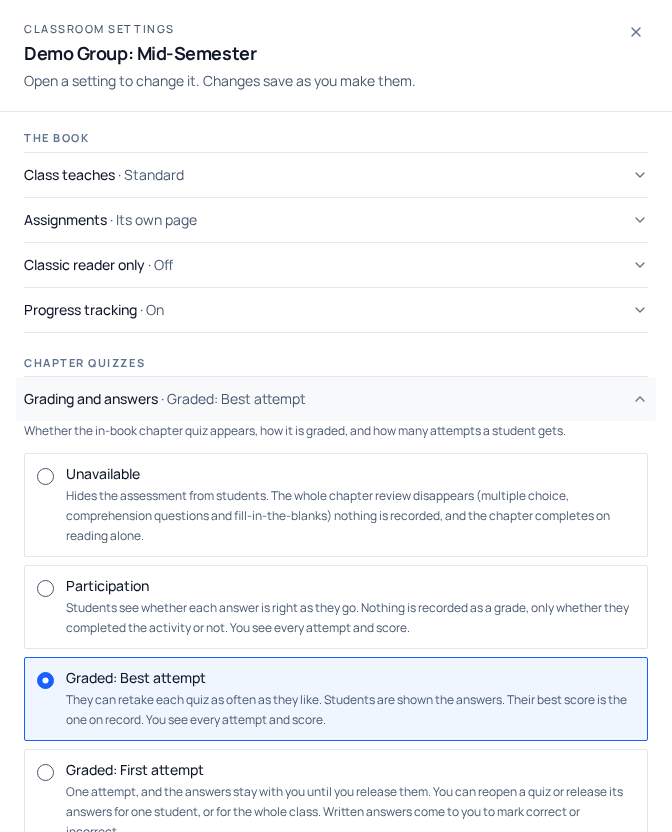
Most chapters of the book end with a review. The multiple-choice part of it is scored, and you decide how: whether students may retake it, which attempt counts, and when they get to see the answers. One setting covers all three. In the reader, students meet this as the Practice quiz at the end of the chapter.
- Where
- Group dashboard → Class settings → Chapter quizzes
- Default
- Graded, Best attempt, and every class you already had was set to it
- Saving
- Saves the moment you choose: there is no Save button
- What you always see
- Every attempt every student made, with its percentage, in every mode
The four modes
| Mode | Attempts | When answers appear | Which attempt is the grade |
|---|---|---|---|
| Unavailable | None: the quiz is hidden | Never | None: there is no quiz |
| Participation | Unlimited | Immediately, question by question | None, only whether they completed it |
| Graded: Best attempt | Unlimited | After they submit | Their best attempt |
| Graded: First attempt | One, until you give another | Only when you release them | The one attempt |
Unavailable
The chapter review does not appear at the end of the chapter at all. Students read the chapter and move on; nothing is recorded, and no attempt can be made. Use it when you assess a chapter your own way, or while you are still deciding.
This replaced the Interactive chapter quizzes checkbox that used to sit on the curriculum page. There were two controls for one decision, on two different screens, and nothing kept them in step. A class could have the quiz switched off in one place and a grading mode set for it in the other. Any class that had quizzes switched off is now on Unavailable, and attempts made before you hid it are still in your records.
Participation
The review becomes practice. A student picks an answer and finds out straight away whether it was right, with the explanation, then moves to the next question. Nothing is recorded as a grade, only whether they completed the activity. They still see whether they have cleared the chapter, because that is what unlocks the rest of their progress, but no percentage and no grade language.
Use it for a chapter you are teaching rather than testing. You still see every attempt and every score for these, "Participation" describes what the student is told, not what gets recorded.
Graded: Best attempt (the default)
The whole multiple-choice section is marked when the student submits it, not question by question. They see their score, which answers were wrong, and the explanations. They can retake it as often as they like.
Their best attempt is the one on record, so retaking can raise a score and never lower it. Every attempt is kept and shown to you in order, and the student is told on the results panel that you can see them all. A retake is practice they are not penalised for, not a way to hide a bad first go.
Graded: First attempt
One attempt. The student submits, sees their score, and that is the end of it. The answers stay with you, and so does any further attempt. The quiz then shows them that the checkpoint is closed and tells them to ask you.
They still see their percentage. What you are withholding is which questions they got wrong, not whether they passed. A student who cannot see either has no way to know where they stand.
This is also the only mode where you mark the written work. In the answers to review queue, a First attempt class gives you Correct and Incorrect buttons instead of "Mark as read" and "Ask for another look", and the student sees which of theirs you marked. It is bounded work here because there is one answer per student per question and they cannot see the key.
Giving a student another attempt
Open the student
Go to My Classrooms, open the class, and click the student on your roster.
Find the checkpoint
Scroll to Chapter checkpoints. Each row shows how many attempts they made, the grade on record, and the date.
Reopen it
Click Reopen on that row. This appears in Graded, First attempt only, in Participation and Best attempt students already retake freely, so there is nothing to release.
Choose what they get
Another attempt, the answers, or both, and whether it is just this student or everyone in the class. The confirmation names exactly what they will be able to do before you commit.
Seeing every attempt
The student's Chapter checkpoints panel lists every attempt they made at each quiz, oldest first, each with its percentage and when it happened. The one that counts is badged On record: their best in both graded modes. Alongside it you get where they started and where they are now, and the latest attempt expanded question by question so you can see what they actually chose.
This is the same in every mode, Participation included, and it stays true for a class you have since moved to Unavailable. The mode decides what the student is shown; it never filters what you see.
Students in more than one of your classes
A student who belongs to several classes takes the settings of the one they joined most recently. If you have a student in two classes with different quiz modes and it matters, the reliable fix is to make the two match rather than to reason about join dates.
A student with no class at all (someone working through the book on their own) is always on Graded, Best attempt. First attempt would leave them with one go and nobody able to give them another, and Unavailable would take the reviews out of a book they paid for.