Grading

How the smart grader works, and what it does not do

The smart grader checks a student's real QuickBooks Online export against an answer key and shows you every check it made. Here is exactly how it scores.

Kind
Overview
Reading time
6 minutes
Last updated
September 24, 2026

Your students do the hands-on work inside QuickBooks Online, export the report to Excel, and upload the file. The smart grader reads that workbook, compares it line by line against the activity's answer key, and shows you every comparison it made. You see the same evidence the score was built from, and you can change any single check you disagree with.

Where
Group dashboard, Needs you
What students upload
The Excel export from QuickBooks Online: .xlsx or .xls, up to 5 MB
How it decides
Deterministic rubric matching against an answer key. Not AI
Who has the last word
You. Every check can be overridden with a reason

What happens when a student submits

  1. The student does the work in QuickBooks

    Activities run in one of three companies: Craig's Landscaping in Intuit's public Test Drive, Imagine Photography, or the YinYang Graphic Design company students build themselves. The activity screen tells them which report to run and exactly how to customize it before exporting.

  2. They export to Excel and upload

    Either Excel workbook is accepted, up to 5 MB. QuickBooks' *reports* export .xlsx, while its *list pages* (Sales → Customers, Expenses → Vendors) export the older .xls. The grader reads both, and picks the reader from the file itself rather than its name, so a renamed export still opens. Students are told to use Export → Export to Excel rather than copying cells into a new spreadsheet: a rebuilt workbook can still be read, but it is what trips the file integrity signals below.

  3. The file is read

    A parser for that report type pulls out the headers and rows. If it cannot read the workbook, the student gets a re-export checklist instead of a score, and the attempt shows as errored in your queue.

  4. Every rubric check runs

    Each check pulls one value, one column, or one row out of the parsed file and compares it against the answer key. Nothing is sampled or estimated. Every check in the rubric runs on every submission.

  5. The file is checked for signs of editing

    A separate pass looks for evidence the workbook was rebuilt or hand-edited after export. This never changes the score.

  6. The result is posted, or held for you

    If smart grading is on for your class, the student sees their score and their rubric ledger immediately. If you turned it off, the submission is held and the student sees a plain "Turned in" confirmation until you release it.

How the score is calculated

Every rubric check is worth a number of points and is marked either required or optional. The arithmetic is deliberately boring:

  • A required check that matches earns its points. A required check that misses earns zero.
  • Every required check adds its points to the total possible, whether the student earned them or not.
  • Optional checks are informational. They contribute to neither side of the sum, so bonus credit can never make up for a failed required check.
  • The score is points earned divided by points possible, rounded to a whole percentage.
  • Pass or fail is that percentage measured against the activity's own passing threshold, which is shown to the student on the activity screen before they start.

The kinds of checks a rubric can make

Rubrics are authored per activity, and every check declares how it compares. The comparison style is not a column in your review table. It is what decides whether a value counts as a match at all. There are five.

ComparisonWhat it doesTypical use
ExactText equality after trimming, collapsing spaces and ignoring case. Accepts named synonyms defined in the rubric.Account names, types, categories
ToleranceNumeric equality within a margin, one cent by default. Understands dollar signs, commas and parentheses for negatives.Balances, totals, amounts
PresenceAsks whether any row in the export satisfies a description, without caring about other columns."This account exists"
Set membershipOrder-independent comparison of a whole list. Can require that a list is contained in, identical to, or absent from what the student produced.Customer, vendor and product lists
FuzzyAllows a small number of character differences: two by default. Used sparingly, and never for accounting structure.Free-text memo lines

The matching is forgiving about form rather than about substance. Every text comparison trims, collapses double spaces and ignores capitalization, and column headers are matched the same way, so a report that exports a column in a different case still grades correctly. When a check has to find its row by name first, that lookup goes further: curly and straight apostrophes, en and em dashes and non-breaking spaces are all folded before comparing, and a sub-account exported in the Parent:Child form still matches a rubric that names the child.

The file integrity signals

Alongside the score, each attempt carries a File integrity figure out of 100 and a short list of signals. On the attempt review page it is labelled Trusted at 90 and above, Review from 60 to 89, and Suspect below 60. The student sees the same number on their own result, in their own wording, "Trusted", "needs review", or "flagged".

  • The workbook was authored by a spreadsheet tool that is never part of QuickBooks' export path.
  • It contains a formula QuickBooks does not emit, such as a cross-sheet reference or an external link.
  • Required columns are missing, which usually means the student skipped the customize step before exporting.
  • The workbook has more than one sheet, where QuickBooks exports one.
  • The filename contains words typical of answer keys.
  • The parser read valid headers but found no data rows at all.
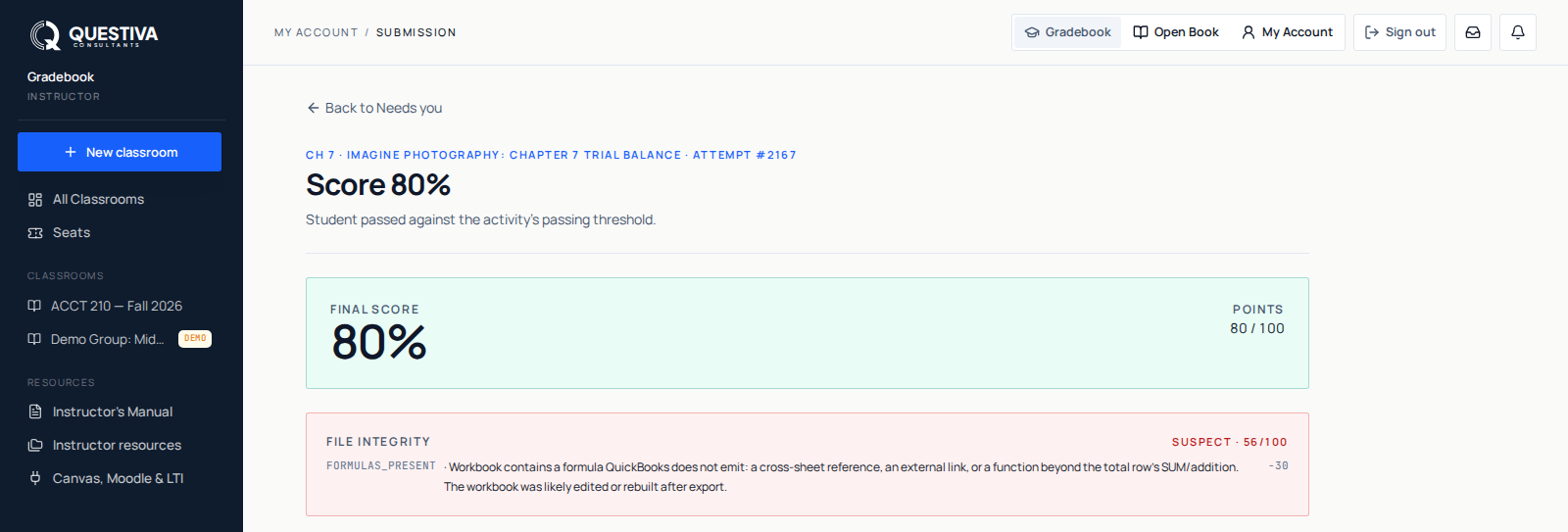
The top of an attempt review page: the activity and attempt number, a Score 69% heading, a Final score panel reading 69% and 22 of 32 points, and a File integrity panel labelled Review 70 out of 100 with one signal code and its deduction.
The score, the points behind it, and the integrity panel. Each signal shows the deduction it carried, so you can explain a number to a student without guessing at it.

What the smart grader does not do

  • It is not AI. It is deterministic rubric matching. The same file graded twice against the same rubric produces the same result, every time.
  • It never connects to QuickBooks Online. It reads the file the student uploaded and nothing else. It has no access to any QuickBooks account, yours or theirs.
  • It does not judge method. It checks the exported report. Two students who reached the same correct report by different routes both get credit.
  • It does not decide integrity questions for you. It reports signals; the academic judgment stays yours.
  • It does not block a student's progress. A graded activity is real coursework and lands in your gradebook, but a student who never uploads can still finish the chapter and the book.

There is one AI feature nearby, and it is deliberately separate. After a failed attempt a student can ask for a written walk-through of what went wrong, and on a first failure it may appear without being asked for. That study help is generated text, is labelled as such, and never changes a score. It is withheld on a held submission, because the verdict it would explain is one the student has not been shown yet.

When you disagree with a check

Open the submission from Needs you (turn on Show reviewed for one already released) and use Override on the row you disagree with. You pick the new verdict, type a reason, and save. The attempt's score recomputes immediately from the corrected checks, and the row carries your name, the timestamp and your reason from then on. You change one check, not the whole submission, and you never have to regrade the parts that were right.

Overriding an optional check flips the tick the student sees without moving the score, because optional checks were never in the sum.

Attempts, files and evidence

Retries are the point. Students fix their work in QuickBooks, export again and resubmit, and their best score is what you see on their student detail page. Every attempt is kept: the queue numbers them per student and per activity, and the attempt review page lists that student's other attempts on the same activity in your class, with a download beside each one. A few activities carry a fixed attempt limit, set for the activity rather than by you; a student who reaches it cannot start another attempt, and starts that were never uploaded do not count against it.

You can download any single workbook, or use Download uploads (.zip) on the class page to pull the latest workbook for each student and activity in one archive, drawn from the 200 most recent submissions in the class. That is worth doing at the end of a term: uploaded workbooks are pruned on a schedule, after roughly six months by default, while the graded record itself is kept about a year.

Worth knowing before your first term

A submission has to know which class it belongs to. It lands in your queue when the student is an active member of a class whose course matches the activity, or when that class is their only one. A student in several classes with no course match submits work that is graded and recorded but attributed to no class, which is the usual reason a score you expected is not in your queue.

Smart grading is a per-class setting. On the class page, Class settings → Smart grading turns it on or off: on, students get an instant score and rubric; off, you grade their submissions by hand and release each one yourself. A student working outside any class always gets the instant result.

Quick answers

Questions we get about this

Does the smart grader connect to my students' QuickBooks Online accounts?
No. It only reads the Excel workbook a student uploads. It holds no QuickBooks credentials and makes no connection to Intuit, so nothing in a student's company file is visible to us or to you through the grader.
Is the grading done by AI?
No. It is deterministic rubric matching: each check pulls a value out of the export and compares it against the answer key using a defined comparison, such as exact text, a numeric tolerance, or a list comparison. The same file always produces the same result. The optional study helper that explains a failed attempt to a student is AI-generated, is labelled as such, and never changes a score.
What happens if the grader marks correct work wrong?
You override that one check. Open the attempt from Submissions, choose Override on the row, set the verdict, and type a reason. The score recomputes from the corrected checks and the override is recorded with your name and the time. Nothing else about the submission is disturbed.
Can a low file integrity score fail a student on its own?
No. The integrity figure and its signals are recorded with the attempt and shown to you in full, and the student sees the figure on their own result, but they never alter the score and never stop a submission from being graded. What to do about a flag is your call.
Still stuck

Ask us directly.

A real person on our team reads every message and replies within one to two business days. If something in your classroom is not behaving the way this guide describes, tell us. That is a bug, and we want it.